Compatible with Chrome and Edge
Instruction Guide
We have a simple tutorial guide which explains the features of the software extension and what each button inside the extension does. Read our tutorial and welcome guide on how to use the extension to the fullest. Use all the features of this browser software.
If you are interested in other web extensions to install, you might wish to check out the Microsoft Bing Search with Rewards extension.
Microsoft Bing Search with Rewards Extension
It allows you to complete daily offers to get points.
Track the number of points you have currently and the rewards you can redeem with these points.
The ways to get points & get rewarded is search with Bing, browse with Microsoft Edge and shop at the Microsoft and Windows stores to earn rewards.
Sponsored Link:
Other useful extensions
Another extension which would be useful to install is the iCloud bookmarks extension.
It allows to keep your Chrome bookmarks on Windows synced up with the Safari bookmarks on your iPhone, iPad, and Mac.
iCloud will store your website bookmarks so it is accessible even on your iPhone and Mac.
Try these other two extensions and see if it will boost your daily productivity.
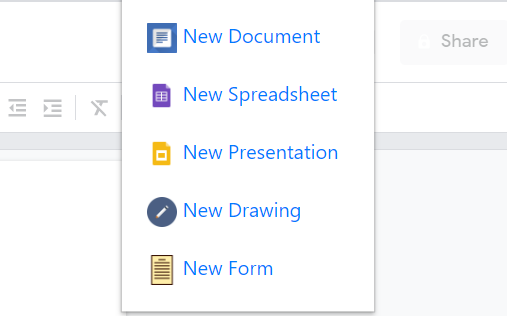
1 Click and you can create a new document/presentation/spreadsheets and much more.
Features:
Install and open.
- After installing the extension. You click on the extension icon and get instant access to all the Google services you use on a daily basis.
What is Google Presentations?
Google Presentations is a free online presentation tool that makes it easy to create, edit and collaborate on presentations.
With Google Presentations, you can:
Create new presentations or edit existing ones
Add text and images to slides
Add shapes and lines to your slides
Add tables to your slides
Use master slides to ensure consistency across all your presentations
Share your presentations with others in real time
What are the benefits of using Google Presentations?
Google Presentations is a presentation software, like PowerPoint or Keynote. The difference is that it's free and cloud-based, so you can use it anywhere with an internet connection.
You can use Google Presentations to:
Collaborate with others on presentations in real time;
Present your ideas and collaborate with others in real time;
Make your slides look great with formatting options and themes; and
Get feedback on your presentation by sharing it publicly or with specific people.
Here are some of the benefits of using Google Presentations:
Google Presentations is a simple and intuitive tool with a clean user interface. It's easy to learn, even if you've never used a presentation program before.
You can collaborate with your team by sharing your project with them, so they can add their own ideas and feedback on your presentation.
If you need to make changes to your slides later, you can do so quickly and easily without losing any work (as long as you haven't shared the presentation).
Tutorial:
- Install the Extension
- After installing the extension, click on the icon on the toolbar.
Sponsored Link: